What Are Vector Embeddings?

.png)
What Are Vector Embeddings?
Introduction: Why Everyone is Talking About Embeddings
If you've explored modern AI applications in the last two years, you've likely encountered vector embeddings. They power the semantic search in your documentation, enable personalized recommendations on streaming platforms, and serve as the foundation for retrieval-augmented generation (RAG) systems that make large language models more accurate and grounded.
Yet despite their ubiquity, embeddings remain mysterious to many product and engineering teams. The term sounds technical-almost mathematical-and explanations often jump straight into cosine similarities and high-dimensional spaces without establishing why any of this matters.
Here's the reality: vector embeddings are simply a way to represent meaning as numbers. Once you understand this core concept, everything else-from similarity search to recommendation engines-becomes remarkably intuitive.
This guide explains vector embeddings from first principles. You'll learn what they are, how they work, when to use them, and most importantly, how they'll affect your product decisions around user experience, performance, and cost.
What Is a Vector Embedding?
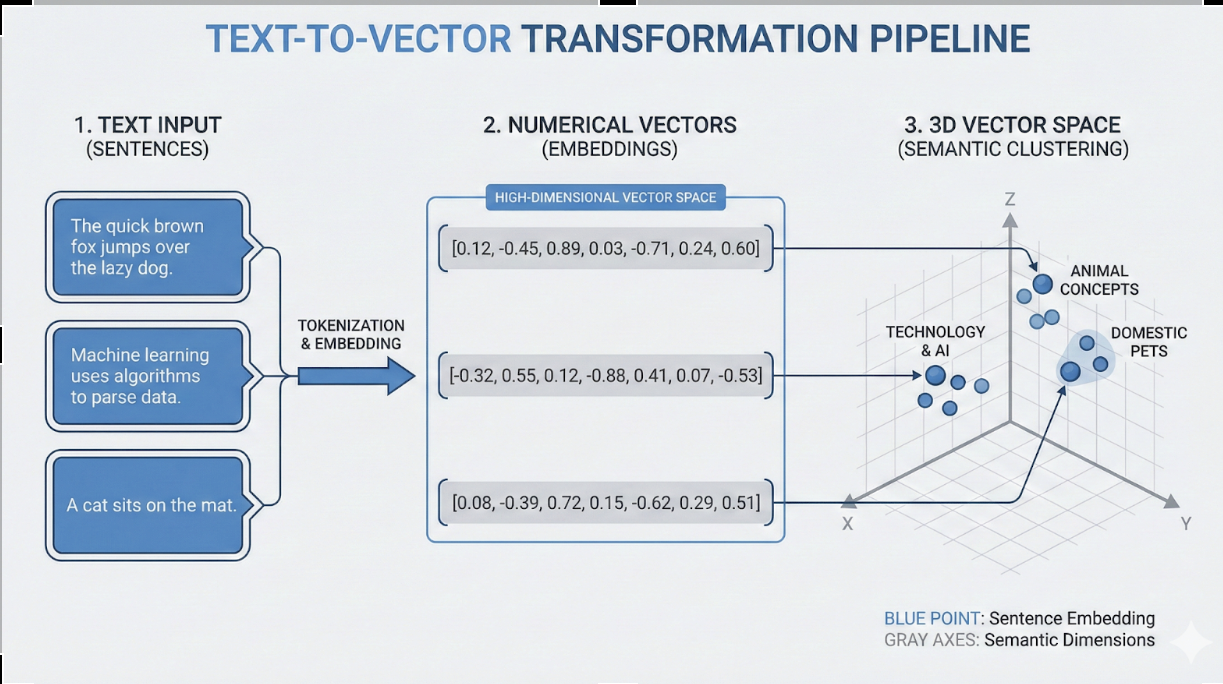
A vector embedding is a list of numbers that represents the meaning of a piece of content.
That content could be:
- A sentence or paragraph of text
- An image
- An audio clip
- A product description
- A user profile
- A code snippet
The embedding captures the semantic essence of that content in a format that computers can mathematically compare and manipulate. Instead of treating text as discrete symbols (like traditional keyword search does), embeddings convert meaning into geometry.
For example, the sentence "The cat sleeps on the couch" might become a vector like:
[0.23, -0.41, 0.87, 0.15, -0.62, ..., 0.34]
This isn't random. Each number in the list represents a learned feature about the sentence's meaning-though these features aren't human-readable. The important part is that similar sentences produce similar vectors, while different sentences produce different vectors.
A Product-Friendly Analogy: "Meaning Coordinates"
Think of embeddings as GPS coordinates for meaning.
Just as every location on Earth can be represented by latitude and longitude (two numbers), every piece of text can be represented by hundreds or thousands of numbers that specify its position in "meaning space."
When two locations are geographically close, their GPS coordinates are similar. When two pieces of text are semantically similar, their embedding vectors are close together in this high-dimensional meaning space.
Consider these three sentences:
- "I adopted a puppy yesterday"
- "My new dog joined the family"
- "The stock market crashed today"
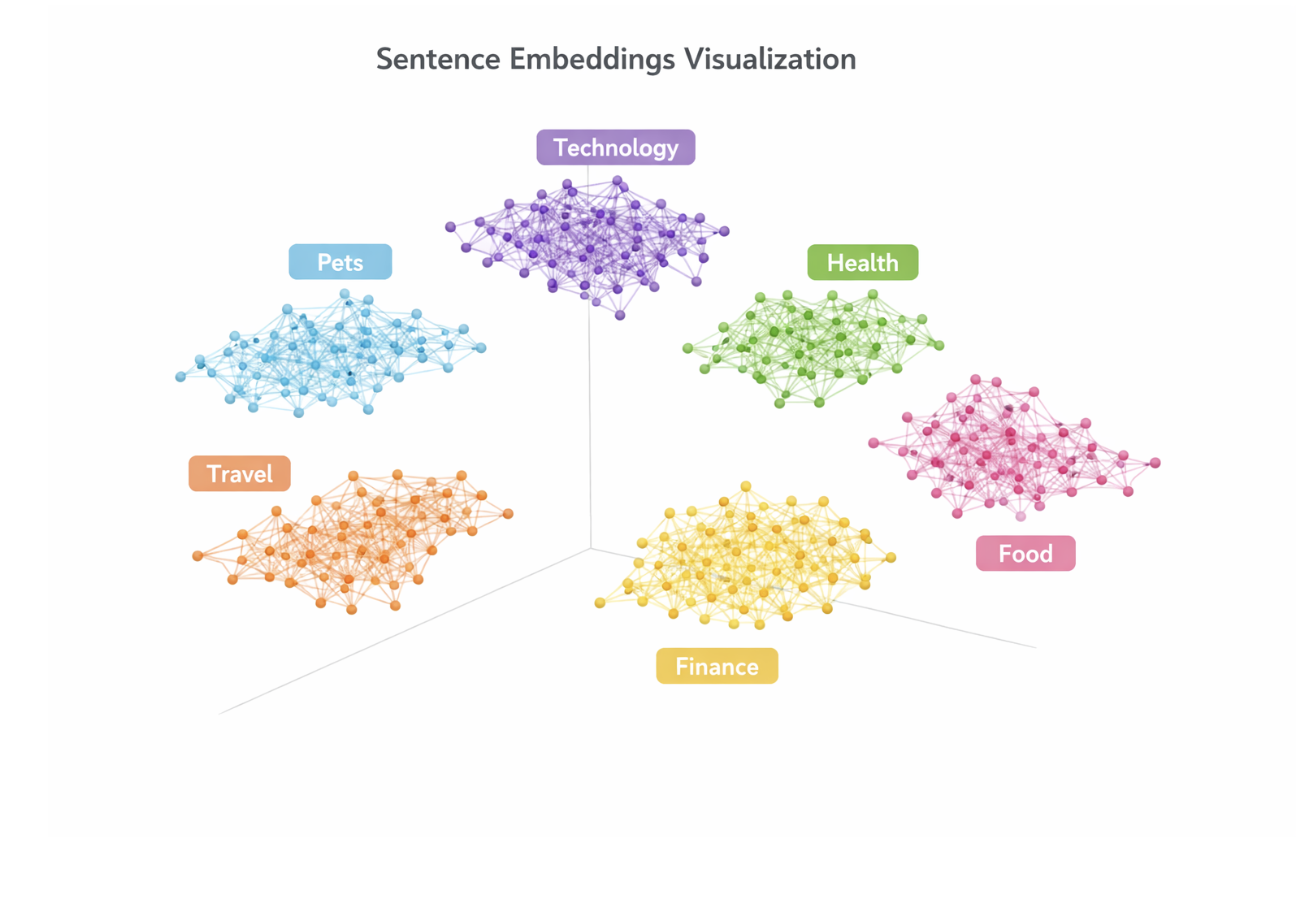
In embedding space, sentences 1 and 2 would sit close together-they discuss the same concept using different words. Sentence 3 would be far away because it discusses an entirely different topic.
This spatial representation of meaning is what makes embeddings powerful. You can ask questions like "find all content similar to this" by simply finding nearby points in the embedding space.
Embeddings enable features that understand user intent rather than just matching keywords. A user searching for "affordable family vehicles" can find results about "budget-friendly minivans" even though the words don't match.
How Embeddings Are Created (Embedding Models)
Embeddings are generated by embedding models-neural networks trained specifically to convert content into meaningful vector representations.
These models have been trained on massive datasets (often hundreds of gigabytes of text) to learn which features distinguish different types of meaning. During training, the model learns to place similar concepts close together and dissimilar concepts far apart in the embedding space.
Popular Embedding Models
For Text:
- OpenAI's text-embedding-3-small and text-embedding-3-large
- Sentence-BERT (SBERT) and all-MiniLM-L6-v2
- Cohere embed-english-v3.0
- Google's text-embedding-gecko
- Open-source models from Hugging Face (BAAI/bge-large-en-v1.5, intfloat/e5-large-v2)
For Images:
- CLIP (Contrastive Language-Image Pre-training)
- ResNet embeddings
- Vision Transformers (ViT)
For Code:
- CodeBERT
- GraphCodeBERT
- StarEncoder
For Multimodal (text + images):
- CLIP
- ALIGN
- ImageBind
What Happens During Embedding Generation
When you send text to an embedding model, several steps occur:
- Tokenization: Your text is broken into tokens (subwords or word pieces)
- Encoding: Each token is converted to an initial numerical representation
- Contextualization: The model processes all tokens together, learning how each word's meaning depends on surrounding words
- Pooling: The model combines token representations into a single fixed-length vector
- Normalization: Often the vector is normalized to unit length for easier comparison
The output is a vector of fixed dimensionality. Common dimensions include:
- 384 dimensions (efficient models like all-MiniLM-L6-v2)
- 768 dimensions (BERT-base models)
- 1024 dimensions (larger models)
- 1536 dimensions (OpenAI text-embedding-3-small)
- 3072 dimensions (OpenAI text-embedding-3-large)
Model choice significantly impacts search quality, latency, and cost. Smaller models (384-768 dimensions) are faster and cheaper but may be less accurate. Larger models (1536+ dimensions) provide better semantic understanding but cost more to generate and store.
Embeddings in Action: Similarity Search
The most common use case for embeddings is similarity search-finding content similar to a query.
Here's how it works:
- Index time: Generate embeddings for all your content (documents, products, images) and store them in a vector database
- Query time: Generate an embedding for the user's search query using the same model
- Search: Find the stored embeddings closest to the query embedding
- Return: Retrieve and display the corresponding content
The mathematical operation for "closeness" is typically:
- Cosine similarity: Measures the angle between vectors (ranges from -1 to 1, where 1 is identical)
- Euclidean distance: Measures the straight-line distance between vectors (smaller is more similar)
- Dot product: Multiplies corresponding vector components and sums them (higher is more similar)
For normalized vectors (the common case), cosine similarity and dot product are equivalent. Most systems use dot product because it's computationally faster.
Numeric Example #1: Similarity Between Sentences
Let's look at a concrete example using simplified 5-dimensional embeddings (real embeddings would have hundreds of dimensions, but the math is identical).
Three Sentences:
- "The dog ran through the park"
- "A puppy sprinted across the grass"
- "The stock price increased sharply"
Their Embeddings (simplified):
- Sentence 1:
[0.8, 0.3, 0.1, 0.0, 0.2] - Sentence 2:
[0.7, 0.4, 0.2, 0.1, 0.1] - Sentence 3:
[0.1, 0.0, 0.8, 0.9, 0.3]
Computing Cosine Similarity
Cosine similarity formula:
similarity = (A · B) / (||A|| × ||B||)
Where:
- A · B is the dot product (sum of element-wise multiplications)
- ||A|| is the magnitude of vector A (square root of sum of squares)
Similarity between Sentences 1 and 2: `` Dot product = (0.8×0.7) + (0.3×0.4) + (0.1×0.2) + (0.0×0.1) + (0.2×0.1) = 0.56 + 0.12 + 0.02 + 0.0 + 0.02 = 0.72
Magnitude of 1 = √(0.64 + 0.09 + 0.01 + 0.0 + 0.04) = √0.78 = 0.88 Magnitude of 2 = √(0.49 + 0.16 + 0.04 + 0.01 + 0.01) = √0.71 = 0.84
Cosine similarity = 0.72 / (0.88 × 0.84) = 0.72 / 0.74 = 0.97 ``
Similarity between Sentences 1 and 3:
Dot product = (0.8×0.1) + (0.3×0.0) + (0.1×0.8) + (0.0×0.9) + (0.2×0.3)
            = 0.08 + 0.0 + 0.08 + 0.0 + 0.06
            = 0.22

Magnitude of 3 = √(0.01 + 0.0 + 0.64 + 0.81 + 0.09) = √1.55 = 1.24

Cosine similarity = 0.22 / (0.88 × 1.24) = 0.22 / 1.09 = 0.20
Interpretation
- Sentences 1 and 2 have similarity 0.97 (very similar-both about dogs/running)
- Sentences 1 and 3 have similarity 0.20 (different topics-pets vs. finance)
In a similarity search for "dog running outside," sentence 2 would rank higher than sentence 3 because its embedding is geometrically closer to the query embedding.
Numeric Example #2: Product Recommendation Similarity
Let's apply embeddings to an e-commerce recommendation system.
Product Descriptions:
- "Wireless Bluetooth headphones with noise cancellation and 30-hour battery"
- "Premium over-ear headphones featuring active noise canceling technology"
- "Stainless steel water bottle, 32oz, keeps drinks cold for 24 hours"
Their Embeddings (simplified 6D):
- Product 1:
[0.82, 0.76, 0.15, 0.08, 0.12, 0.21] - Product 2:
[0.79, 0.81, 0.12, 0.05, 0.18, 0.25] - Product 3:
[0.11, 0.09, 0.88, 0.73, 0.19, 0.08]
User Viewing Product 1 (Bluetooth Headphones)
The system computes similarity between Product 1 and all other products:
Product 1 vs Product 2:
dot_product = (0.82×0.79) + (0.76×0.81) + (0.15×0.12) + (0.08×0.05) + (0.12×0.18) + (0.21×0.25)
            = 0.648 + 0.616 + 0.018 + 0.004 + 0.022 + 0.053
            = 1.361
Product 1 vs Product 3:
dot_product = (0.82×0.11) + (0.76×0.09) + (0.15×0.88) + (0.08×0.73) + (0.12×0.19) + (0.21×0.08)
            = 0.090 + 0.068 + 0.132 + 0.058 + 0.023 + 0.017
            = 0.388
Recommendation Result
The system recommends Product 2 (dot product 1.36) over Product 3 (dot product 0.39) because the headphones are semantically similar to the viewed item, while the water bottle is not.
This works even though the exact words differ. Product 1 says "Bluetooth" and "noise cancellation," while Product 2 says "noise canceling" with different spelling. Keyword matching would struggle here, but embeddings capture the semantic equivalence.
Vectors vs. Embeddings
In the world of AI infrastructure, you will often hear "vector" and "embedding" used interchangeably. While they are closely related, there is a helpful distinction to make between the format and the concept.
The Vector (The Format)
A "vector" is a mathematical term for a list of numbers, like [1.5, 3.2, 5.0]. Vectors are used in many fields, from physics (velocity vectors) to computer graphics (position vectors) to machine learning. A vector is simply the data structure or the "container" that holds numerical information.
The Embedding (The Semantic Concept)
An "embedding" is a specific type of vector. It is a vector that has been "learned" by a model to represent the meaning of data (like text or images) in a lower-dimensional space.
- Not all vectors are embeddings: A vector representing the RGB values of a pixel
[255, 0, 0]is a vector, but it is not an embedding because it describes raw data, not latent meaning. - All embeddings are vectors: The output of OpenAI's text-embedding-3 is a list of numbers—so it is technically a vector.
Why the Distinction Matters
Understanding this helps clarify the tooling ecosystem:
- Vector Databases (e.g., Endee): These systems are built to store and search vectors. They don't technically care if the numbers inside represent the meaning of a poem or the features of a weather pattern. They are the engine.
- Embedding Models: These are the systems that create the embeddings. They are responsible for the "intelligence" that ensures the numbers actually represent meaning.
In short: You use an Embedding Model to turn your data into meaning, and a Vector Database to store that meaning efficiently.
Embeddings & LLMs (How They Work Together in Apps)
A common misconception: embeddings and large language models (LLMs) are the same thing. They're not-but they work beautifully together.
Embeddings: The Retrieval Layer
- Purpose: Find relevant information quickly
- Strength: Fast similarity search across millions of documents
- Output: A ranked list of relevant documents
- Speed: Milliseconds to search millions of vectors
- Cost: Low (simple mathematical operations)
LLMs: The Generation Layer
- Purpose: Understand and generate natural language
- Strength: Reasoning, synthesis, conversational responses
- Output: Generated text based on context
- Speed: Seconds (depending on output length)
- Cost: Higher (thousands of tokens processed)
How They Work Together: RAG (Retrieval-Augmented Generation)
Modern AI applications typically combine both:
Step 1 (Retrieval): User asks "What's our refund policy for damaged items?"
- Generate embedding for the query
- Search vector database for similar content
- Retrieve top 5 most relevant policy documents
Step 2 (Augmentation):
- Combine retrieved documents with user query
- Pass this context to an LLM
Step 3 (Generation):
- LLM reads the retrieved context
- Generates an accurate, contextual answer grounded in actual policy
Why This Architecture Matters
Without embeddings (LLM alone):
- Must fit all knowledge in the prompt (limited context window)
- May hallucinate answers not based on actual data
- Expensive (processing all documents every query)
Without LLMs (embeddings alone):
- Can only return documents, not synthesize answers
- No reasoning or conversational ability
- User must read raw documents
Together:
- Fast retrieval of relevant facts (embeddings)
- Intelligent synthesis and reasoning (LLM)
- Grounded responses without hallucination
- Cost-effective (only process relevant documents)
Understanding this separation helps you optimize costs and latency. The retrieval layer (embeddings) handles the heavy lifting of searching millions of items in milliseconds. The LLM only processes the small subset of relevant results, keeping generation fast and cheap.
Where Vector Databases Fit (And Why Endee Exists)
Once you have embeddings, you need somewhere to store and search them efficiently. That's where vector databases come in.
The Problem: Scale
Imagine you have 10 million product descriptions, each with a 1536-dimension embedding. Naive comparison would require:
10,000,000 products × 1,536 dimensions × 4 bytes (float32) = 61.44 GB of memory
And for each query, you'd compute similarity against all 10 million vectors-prohibitively slow.
The Solution: Vector Databases
Vector databases solve this with specialized data structures and algorithms:
Approximate Nearest Neighbor (ANN) Search:
Instead of checking every vector, ANN algorithms build indexes that dramatically reduce search space:
- HNSW (Hierarchical Navigable Small World): Graph-based index offering excellent speed/accuracy tradeoff
- IVF (Inverted File Index): Partitions space into clusters, searches only relevant partitions
- Product Quantization: Compresses vectors to reduce memory usage
- FAISS, Annoy, ScaNN: Popular open-source ANN libraries
These techniques enable:
- Speed: Search millions of vectors in milliseconds instead of seconds
- Memory efficiency: Compression reduces storage by 4-32×
- Accuracy: Tunable precision/recall tradeoffs (typically 95-99% recall)
Ready to Build with Endee?
If you're ready to implement production-grade semantic search, Endee provides the high-performance infrastructure you need. Designed for scale, Endee offers sub-5ms query latency, robust hybrid search capabilities, and a developer-friendly API that integrates seamlessly into your stack. Whether you are building RAG agents or recommendation engines, Endee handles the complexities of vector storage so you can focus on building great AI features. Check out our benchmarks at endee.io/benchmarks to see the difference.